
Substack AI Detection: What the Score Means + 7 Tips
Substack AI detection uses Pangram to estimate whether writing is human-written or AI-assisted. It can't measure the care behind your post. You can check a draft, report an error or disable scanning. Here's what those choices mean, plus seven tips to help you stand behind what you publish.
Last Updated: November 3, 2026
Will Someone See That Score and Think You're a Fake?
You spent time getting a post right. You checked the information. You went back and forth with AI because the first draft didn't say what you meant.
Then you hear that a reader can scan it.
And suddenly the thing taking up space in your head is… “Are they gonna think I didn't know any of this? That I let a machine do all the thinking?”
I understand that fear. I use AI to help me write, and I say so openly. But when I first heard about the scan, I felt nervous too.
Out of curiosity, I checked one of my own posts. The result said Fully Human-Written. I was happily surprised.
One post, though. I don't run every piece through the detector, and that result doesn't explain my whole writing process.
More to the point, my identity doesn't go up or down with the score. I'm God's daughter before anyone reads the post. I can remember that AND take the writing seriously.
So let's separate what the tool checks from what you're afraid a reader will assume…
What Does Substack's AI Scan Actually Tell a Reader?
The scan estimates AI involvement in the finished text. It doesn't watch you work. It can't see the client experience behind an example, the opinion you corrected or the source you opened to check a fact.
Substack introduced the feature with Pangram on July 21, 2026. In its launch announcement, Substack itself distinguishes AI detection from judging the human care behind a piece.
A writing score doesn't tell a reader whether your advice is good.
A careful writer still has to check the claims. An expert still has to explain the idea. And a reader still has to read the work to decide whether it helps them.
There's another distinction to know before you decide how much a scan might expose…
Who Can See the Analysis or an AI Badge?
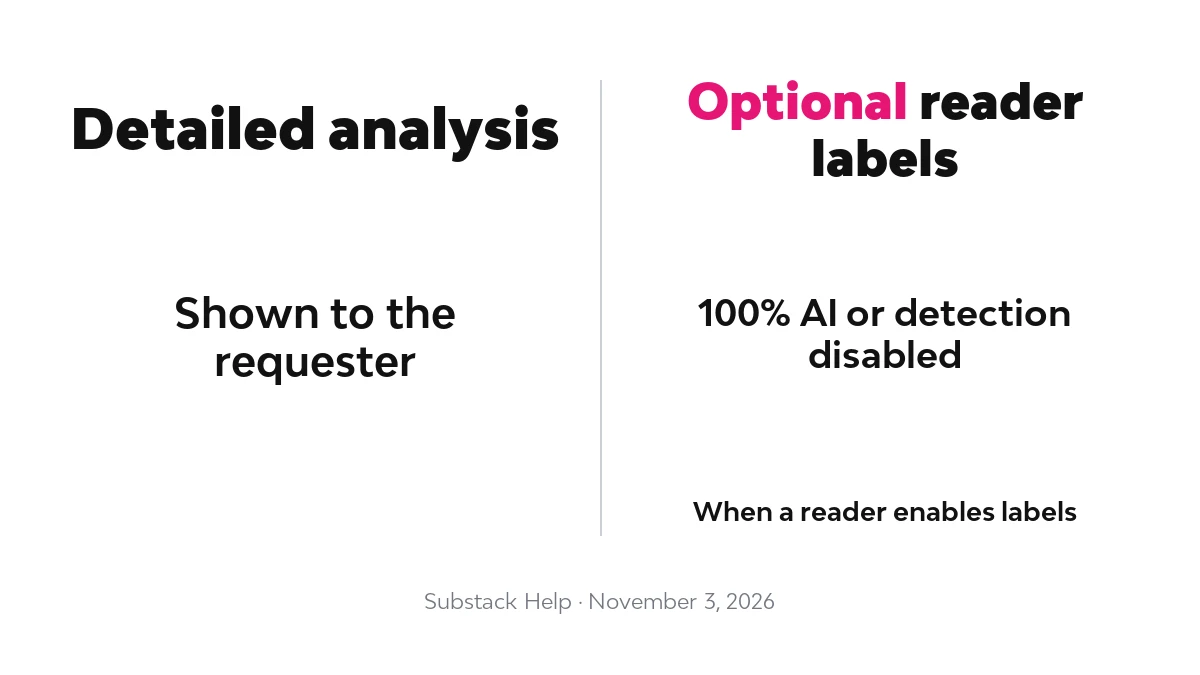
Substack says a requested analysis goes to the person who requested it. That isn't the same thing as saying nobody else can ever see an AI label.
Its current help page also describes an optional reader setting, Label content. It can show a badge for text detected as entirely AI-generated, or when the author has disabled detection.
The scan and the feed badge are different features. Neither is a public record of every conversation you had with AI.
That conversation matters, though, because it's where you can bring something a machine hasn't lived… YOUR experience.
How Do You Keep Your Own Thinking in AI-Assisted Writing?
You don't have to wait until you have some elaborate system. Start with what you know, what you believe and the person you're trying to help.
If you've only ever typed “write a post about…”, give yourself some grace. The next piece can start differently.
Here are the seven choices I want you to have…
01 Say What You Think Before You Ask AI to Write
Open the voice recorder on your phone. Talk through the idea as if a person had asked for your help.
What do you want them to understand? Why do you believe it? What have you seen in your own work that makes this worth sharing?
Keep the useful detour. That little example you almost skipped might explain the point better than another polished paragraph.
Give AI your thinking to work WITH. Otherwise, you're asking it to supply an opinion before you've told it yours.
And if your voice note leaves something out, let the tool ask…
02 Let AI Ask Before It Fills in the Gaps
Tell it to read your notes and ask what it still needs to know, one question at a time.
Maybe you named what you believe but never explained why. Maybe you mentioned a client situation without saying what you did. That's useful missing information. An invented example isn't a substitute for it.
This topic began with AI asking me questions. My answers gave it my perspective on the scan, my initial worry and the point I wanted to make.
I still had to read what came back. (Oh, there was editing.) But at least we were working from what I thought, instead of cleaning up an opinion I never had.
Next, give it someone specific to talk to…
03 Tell AI Who Needs This Explanation
A fellow expert and someone thinking about hiring you may need very different explanations of the same work.
Your colleague might understand the name of your approach. Your prospective client wants to know how it helps with the problem they're living with.
Tell AI which person you're writing for, what they already know and what they're trying to understand. If you need to work that out first, how to explain what you do in one sentence walks through that separate question.
My free AI tool, Get Off Mute™, can also help you get clear on who you help and what you help them do.
Once the reader is clear and the draft comes back, the responsibility stays with you…
04 Read Every Line Before You Put Your Name on It
Check whether the draft says what you intended. Then check whether the information is right.
Those are two different checks. A sentence can sound exactly like something you'd say and still contain a wrong fact.
If AI added a study, open the original source. If it added a story you never told, don't let that story become yours by leaving it in the draft. If your reason for giving the advice disappeared, put that reason back.
Then read the piece out loud. Notice the places where you'd stop and say, “Wait. That's not what I mean.”
Your reader doesn't have the explanation sitting in your head. They only have the words you publish. My 10-minute bio test works from that same idea when the problem shows up in your profile.
Now you can decide whether you wanna see what the scan says…
05 Check a Draft Without Making the Score Your Goal
Substack lets writers scan drafts before publishing. That gives you a chance to see the kind of result a reader might request later.
If you try it, compare the result with the work you actually did. Did AI insert something you can't support? Fix that. Did the draft lose the reason you believe the advice? Put it back.
But don't replace an accurate explanation with something you wouldn't normally say just to chase a different percentage.
Write for the person you're called to serve. A sentence they can understand has a job to do beyond pleasing a detector.
And if you believe the result is mistaken, you have a choice besides rewriting the entire post…
06 Use the Platform's Options for a Result You Dispute
On the analysis report, Substack's current help directs writers to Report detection error. Send the feedback about the mistake you believe it made. Reporting isn't a promise of a changed score.
You can also disable detection for an individual post or Note. A reader requesting the scan then sees that detection is unavailable. The optional feed badge can still show that you switched it off.
Pick the option that fits how you wanna manage your work. Turning the feature off doesn't create a human-written result, and leaving it on doesn't explain every part of your process.
The part you can keep explaining in your own words is how YOU use AI. Which brings me to a habit I'm keeping…
07 Keep the Punctuation and Examples That Sound Like You
I used em dashes before these writing tools were everywhere. Now I sometimes wonder whether someone will see one and think a robot wrote the sentence.
Yes, I use AI. But the punctuation was mine first!
Pangram says one writing habit, such as an em dash, doesn't decide its classification by itself. That's the maker explaining its detector, not a promise that no scan ever makes a mistake.
I'm not gonna spend my writing time trying to please every possible opinion about a dash.
Keep the example you can explain from experience. Keep the opinion you have a reason for. Keep the way you speak to the people God called you to serve.
That gives AI something specific to help you express, and it gives you something you can stand behind.
There are a few practical questions still worth clearing up…
You Might Ask
Does Substack Have AI Detection?
Yes. Substack uses Pangram for its text-scanning feature. But access depends on where someone opens the writing. If you read a newsletter in an email and don't see a scan option, that doesn't mean the same written post can't be scanned in Reader. Before you assume Substack removed the scan option, check where you're viewing the post and consult its current help for that surface.
How Accurate Is Substack AI Detection?
Substack says the tool isn't perfect. A percentage on your post isn't proof of every step you took to create it, and my single human-written result isn't an accuracy test. If you disagree with a result, keep the actual issue specific: what the report says, what you believe is wrong and the feedback you wanna submit. Check the advice and the sources behind it. A percentage can't do those checks for you.
How Do I Disable AI Detection on Substack?
Use the option for the individual piece. For a draft post, Substack's help places it on the Publish page. The Note workflow uses its analysis menu. Check the current instructions for the device you're using, because the steps differ. Before you choose, decide what you're trying to accomplish: disabling a scan controls availability. It doesn't revise the writing, verify your facts or turn the text into a human-written result.
What Does AI Detection Unavailable Mean?
It means a Pangram analysis isn't available for that piece in that context. It isn't a statement that the writing passed a human-authorship test. Consider where you're reading and whether detection has been disabled rather than treating the message as a quality rating. If you're the writer, the useful next question is still whether the post says what you meant and whether you can support the advice you've put your name on.
What Does Substack Use for AI Detection?
It uses Pangram. That answers who supplies the detector, but it doesn't mean every writing problem needs another tool. If your draft sounds nothing like you, start with the material you gave the AI helping you write. Did it have your point of view, your reasons and an explanation of who you're helping? A detector score doesn't supply those missing ingredients. You do that part before the next draft.
Can Substack Detect AI in Every Post?
No. Substack's help excludes video and audio posts, emails and written posts viewed on standalone publication sites. Very short Notes can also return an insufficient-text message. Those limits describe where an analysis is available. They don't tell you whether a piece is accurate or worth reading. Wherever you publish, check the writing itself and make sure the help you're offering reflects what you know, rather than what AI filled in for you.
Who Gets to Decide What You Put Your Name On?
I know what it's like to worry about being seen as someone you're not. That feeling didn't begin with an AI scan. I hid parts of myself long before that.
Standing in my identity in Christ changed the place I was making those decisions from. I can be open about using AI and still be clear that the experience, the beliefs and the final decision are mine.
You can do that too.
Bring your thinking. Check the facts. Read the draft. Then decide whether it says what you want the people you're called to serve to hear.
And when you apply that care to the top of your sales page, you want a prospective client to understand what you help them do, not work their way through another lovely paragraph that says very little.
Save your seat at my free live sales-page workshop. Send your sales page link and attend live to get my feedback on the top of your sales page, so you can see what's making people click away and how to fix it.